PoSDK Logo
  • PoSDK User Guide
    • Core Features
    • System Architecture
    • Copyright Tracking and Intellectual Property Protection
      • Why Copyright Tracking?
      • PoSDK’s Solution
      • How It Works
    • Automatic Evaluation
      • Why Automatic Evaluation?
      • PoSDK’s Solution
    • Platform Integration and Comparison
      • Why Platform Comparison?
      • PoSDK’s Solution
      • How to Use the Comparison Feature
  • Platform Comparison Test Results
    • Platform Introduction
      • PoSDK
      • OpenMVG (Open Multiple View Geometry)
      • COLMAP
      • GLOMAP (Global Mapping)
    • Test Environment
    • Sparse Point Cloud Visualization
    • Total Runtime Comparison
    • Accuracy Comparison Results
      • 1. Global Pose Rotation Error
      • 2. Global Pose Translation Error
      • 3. Relative Pose Rotation Error
    • Dataset Details
      • Strecha Dataset
  • Copyright Tracking
    • How It Works
    • Features
      • Automatic Copyright Collection and Display
      • Copyright Information Display Examples
        • Instant Display When Method is First Loaded
        • Copyright Summary at End of Process
    • How to Enable Copyright Tracking
      • Method 1: Derive from MethodPreset (Recommended)
      • Method 2: Derive Directly from Method
        • Important Warning
      • Copyright Tracking Function Documentation
      • Selection Recommendations
      • Reference Implementation
    • How to Define Copyright Information in Plugins
      • Basic Usage
      • Default Behavior
      • Copyright Information Writing Guidelines
      • Complete Example
      • Copyright Declaration When Using Third-Party Libraries Important
        • Recommended Format (Multi-Dependency Library Copyright Template)
        • Simplified Format (For Fewer Dependency Libraries)
        • Important Notes
    • Application Scenarios
      • Academic Research
      • Commercial Applications
      • Open Source Projects
    • Best Practices
      • Recommended Practices
      • Practices to Avoid
    • Frequently Asked Questions
      • Q: What if I don’t want to display copyright information?
      • Q: Will copyright information affect performance?
      • Q: Can I modify other people’s copyright information?
      • Q: My plugin uses multiple third-party libraries. Do I need to list them all?
      • Q: Why can’t I return independent copyright information for each third-party library?
      • Q: What happens if I forget to list a third-party library’s copyright information?
  • Installation Guide
    • Quick Start
    • Recommended Reading Order
    • Quick Links to Common Issues
    • Document List
      • Installation Guide
        • System Requirements
        • One-Click Installation
        • PoSDK Framework Development Dependencies
        • Detailed Installation Process
        • Quick Start
        • FAQ and Troubleshooting
      • Using Precompiled po_core_lib
        • Core Library Structure
        • Core Components Description
        • Integration in CMake Projects
        • Basic Usage Examples
        • View Available Plugin Types
        • Compilation and Execution
        • Troubleshooting
      • po_core Build Environment and Version Information
        • Overview
        • Build Platform Support
        • Build Tool Version Requirements
        • Dependency Library Version Information
        • Related Documentation
  • Basic Plugin Development
    • Quick Start
    • Plugin Registration
      • Plugin Registration Method
      • Example - Plugin Registration
    • Plugin Directory Management
    • Plugin Loading Mechanism
      • Manually Specify Plugin Directory
      • Get Available Plugin Types
    • Plugin Development Guide
      • Plugin Development Quick Example
        • Plugin Registration System
        • Method Plugin Development Quick Example
        • Example 1: Simple Method Plugin
        • Example 2: Method Plugin with Configuration
        • Example 3: Method Plugin with Performance Analysis
        • DataIO Plugin Development Quick Example
        • Example 4: DataIO Plugin Supporting Protobuf Serialization
        • Key Points Summary
        • Next Steps
      • Data Plugin (Data Plugin)
        • Interface Introduction
        • Optional Derivation Methods
        • Example
        • Data Configuration
        • Core Data Types
      • Method Plugin (Method Plugin)
        • MethodPreset Common Operation Functions Quick Reference
        • Interface Introduction
        • Optional Derivation Methods
        • Example
        • Method Parameter Configuration
        • Core Data Types
        • MethodPreset Function Details
      • Ground Truth and Evaluation
        • Quick Navigation
        • Data Package Management
        • Function Details
        • Application Examples
        • Best Practices
        • References
    • Built-in Type Reference
      • Built-in Data Types
        • Common SfM Data Types
      • PoSDK Plugin List
        • Plugin Function Table
        • Core Pipeline Plugin Details
        • Plugin Categories
        • Usage Instructions
  • Advanced Development
    • Detailed Plugin Derivation Choices
      • Data Plugins (Data Plugin)
      • Method Plugins (Method Plugin)
    • Data Mapping and Exception Handling
      • Data Access and Type Safety (GetDataPtr)
      • Input Data Provision Methods (MethodPreset Derived Classes)
      • Exception Handling
    • Profiler
      • What is a Performance Label?
      • Basic Usage
        • 1. Automatic Function Performance Measurement
        • 2. Measure Specific Code Segment Performance
        • 3. Enable Profiler and View Results
      • Performance Report Output Examples
        • Console Output
        • CSV File Output (performance_report.csv)
      • Advanced Usage Tips
        • Using Different Performance Metrics
        • Monitoring External Program Performance
        • Experiment Comparison Analysis
      • Practical Recommendations
      • System Configuration
      • Quick Feature Navigation
        • Quick Start
        • Profiler Macro Categories
        • ProfilerManager Management Functions
        • ProfilerSession Session Functions
      • Complete Function and Macro Reference
        • ProfilerManager Core Functions
        • ProfilerSession Core Functions
        • Profiler Macro Detailed Reference
      • Performance Metrics Description
        • Time Metric (TIME)
        • Memory Metric (MEMORY) - Important: Now Incremental Statistics
        • CPU Metric (CPU)
        • Thread Count Metric (THREADS)
        • Subprocess Monitoring (SUBPROCESS)
      • Typical Usage Examples
        • Basic Performance Profiling Usage
        • Advanced Performance Profiling Configuration
        • Structured Labels and Stage Analysis
        • System Command Performance Monitoring
        • Accumulated Statistics and Data Export
        • Scope Automatic Management
      • Profiler Macro Usage Guide
        • Basic Usage Macros
        • Advanced Feature Macros
        • Stage Analysis Macros
        • Scope Analysis Macros
        • System Command Macros
        • Statistics Display Macros
      • MethodPresetProfiler Integration Examples
        • Basic Integration
        • Experiment Comparison Example
      • Performance Statistics Output Description
        • Console Output Example
        • CSV Export Format
        • CSV Header Description
      • Important Notes
        • Memory Statistics Description
        • Performance Overhead
        • Platform Compatibility
        • Usage Recommendations
    • EvaluatorManager Accuracy Evaluator
      • Core Functions
        • 1. Evaluation Result Collection
        • 2. CSV Table Export
      • Standard Evaluator Development Flow
        • Step 1: DataIO Plugin Development
        • Step 2: EvaluatorStatus Result Encapsulation
        • Step 3: EvaluatorManager CSV Export
      • CSV Table Style Details
        • CSV Header Parameter Correspondence
        • Parameter Configuration Example
        • CSV Table Style Details
        • Multi-type Note CSV Output
        • Batch Export Results
        • Actual Usage Example
      • Core Function Reference
        • Evaluation Result Addition Functions
        • CSV Table Export Functions
      • Usage Examples
        • Complete Evaluation Flow Example
        • Multi-algorithm Comparison Example
      • Notes
    • Serialization Storage and Reading (PbDataIO)
    • Method Configuration Files (INI)
  • PoSDK Data Converters
    • Converter Module Structure
      • File Organization
      • Module Responsibilities
    • Converter Feature Comparison
    • Detailed Documentation
      • OpenCV Data Converter
        • Conversion Architecture
        • Feature Point Conversion
        • Descriptor Conversion
        • Image Feature Information Conversion
        • Batch Feature Conversion
        • Match Conversion
        • Camera Model Conversion
        • Error Handling and Debugging
        • Complete Workflow Example
      • OpenMVG File Converter
        • Conversion Function Overview
        • File Loading Functions
        • Data Conversion Functions
        • Complete Workflow Examples
        • OpenMVG File Format Description
        • Error Handling
      • OpenGV Data Converter
        • Conversion Function Overview
        • Bearing Vector Conversion
        • Pose Conversion
        • Camera Parameter Conversion
        • Complete Workflow Examples
        • OpenGV Algorithm Support
        • Error Handling
      • COLMAP File Converter
        • Conversion Function Overview
        • COLMAP → PoSDK Conversion
        • PoSDK → COLMAP Export
        • COLMAP File Format Support
        • Coordinate System Conventions
        • Complete Workflow Examples
        • COLMAP Binary Format Description
        • Error Handling
    • Quick Start Examples
      • OpenCV Feature Extraction and Conversion
      • OpenMVG Data Loading
      • OpenGV Pose Estimation
      • COLMAP Data Loading
      • Export to COLMAP Data Format
  • Coordinates, Pose Conversion, and Evaluation
    • Pose Conventions and Conversions
    • Dataset Specifications
    • Accuracy Evaluation System
      • Pose Representation Conventions
        • PoSDK Standard Pose Conventions
        • OpenGV Conventions
        • OpenCV Pose Conventions
        • OpenMVG Pose Conventions
        • GraphOptim Pose Conventions
      • Processing Real-World Datasets
        • Strecha Dataset Pose Conventions
        • 1DSfM Dataset
        • RANSAC 2020 (CVPR Workshop) Dataset
      • PoSDK Accuracy Evaluation System
        • Evaluation System Overview
        • Evaluation Process
        • Mathematical Foundation
        • Usage Example
        • Notes
  • Version History
    • Latest Version
    • Future Plans
  • Frequently Asked Questions (FAQ)
    • FAQ Categories
    • Quick Navigation
      • Dependency-Related Issues
      • Installation Issues
      • Plugin Development
    • Getting Help
  • Team Information
    • Core Developers
    • Contributing Developers
    • Other Contributors
  • Appendices
    • PoSDK Core Data Types
      • Modular File Structure
        • File Organization
        • Module Responsibilities
      • Quick Navigation
        • Fundamental Types Quick Navigation
        • Camera System Quick Navigation
        • Image Management Quick Navigation
        • Feature System Quick Navigation
        • Matching System Quick Navigation
        • Track System Quick Navigation
        • Pose System Quick Navigation
        • 3D Point Cloud System Quick Navigation
        • Mathematical Transform Quick Navigation
      • Fundamental Types (types/base.hpp)
        • Fundamental Identifier Types
        • Eigen Mathematical Types
        • Method Configuration Types
        • Data Package Types
      • Camera Model (types/camera_model.hpp)
        • Core Features and Usage Patterns
        • Typical Usage Examples
        • DistortionType
        • CameraModelType
        • CameraIntrinsics
        • CameraModel
        • CameraModels
        • Camera Model Related Type Definitions
      • Image Management (types/image.hpp)
        • Image Path Type Definitions
      • Features (types/features.hpp)
        • Core Features and Usage Patterns
        • Typical Usage Examples
        • Fundamental Feature Types
        • DescriptorsSOA (Recommended)
        • FeaturePoints (Recommended)
        • FeaturePoint (Legacy, Retained for Compatibility)
        • ImageFeatureInfo
        • FeaturesInfo
        • Feature-Related Type Definitions
      • Matching (types/matches.hpp)
        • IdMatch
        • Match Collection Type Definitions
        • Bearing Vector Type Definitions
        • Bearing Vector Utility Functions
      • Tracks and Observations (types/tracks.hpp)
        • Core Features and Usage Patterns
        • Typical Usage Examples
        • ObsInfo
        • Track
        • TrackInfo
        • Tracks
        • Track-Related Type Definitions
      • Relative Poses (types/relative_poses.hpp)
        • Core Features and Usage Patterns
        • Typical Usage Examples
        • RelativeRotation
        • RelativePose
        • RelativeRotations
        • RelativePoses
        • Relative Pose-Related Type Definitions
        • Utility Functions
      • Global Poses (types/global_poses.hpp)
        • Global Rotation and Translation Types
        • PoseFormat
        • EstInfo
        • GlobalPoses
      • 3D Point Cloud Types (types/world_3dpoints.hpp)
        • Basic 3D Point Type Definitions
        • WorldPointInfo
        • 3D Point Cloud-Related Type Definitions
      • Similarity Transform (types/similarity_transform.hpp)
        • Basic Type Definitions
        • SimilarityTransformError
        • Similarity Transform Template Functions
        • Mathematical Utility Functions
    • Common Utility Functions
      • Configuration Parameter Access
        • GetOptionAsIndexT
        • GetOptionAsInt
        • GetOptionAsFloat
        • GetOptionAsDouble
        • GetOptionAsBool
        • GetOptionAsString
        • GetOptionAsPath
      • Data Type Conversion and Access
        • GetDataPtr Function
      • String Conversion Utilities
        • String2Float
        • String2Bool
        • Deprecated Functions
    • Logging Management
      • Log Levels
      • Bilingual Log Macros
        • Basic Bilingual Log Macros
        • Always Output Log Macros
        • Shortcut Log Macros
        • Conditional Log Macros
      • Log Level Control
        • Set Log Level
        • Get Current Log Level
        • Check If Should Output Specified Level
      • File Output Management
        • Enable Log File Output
        • Disable Log File Output
        • Check File Output Status
        • Get Current Log File Path
      • Source File Location Configuration
        • Enable Source File Location Display
        • Disable Source File Location Display
        • Check Source File Location Display Status
      • Performance Statistics
        • Get Processed Log Count
        • Get Dropped Log Count
        • Force Flush All Buffers
      • Language Environment Settings
      • DEBUG Log Compile-Time Disable
      • Output Format
        • Basic Format
        • Format After Enabling Source File Location
        • Example
      • Complete Example
PoSDK
  • Copyright Tracking
  • View page source

Copyright Tracking

PoSDK’s built-in automatic copyright tracking automatically collects, manages, and displays copyright information for all plugins and algorithms at runtime, maintaining transparency and traceability of intellectual property.

How It Works

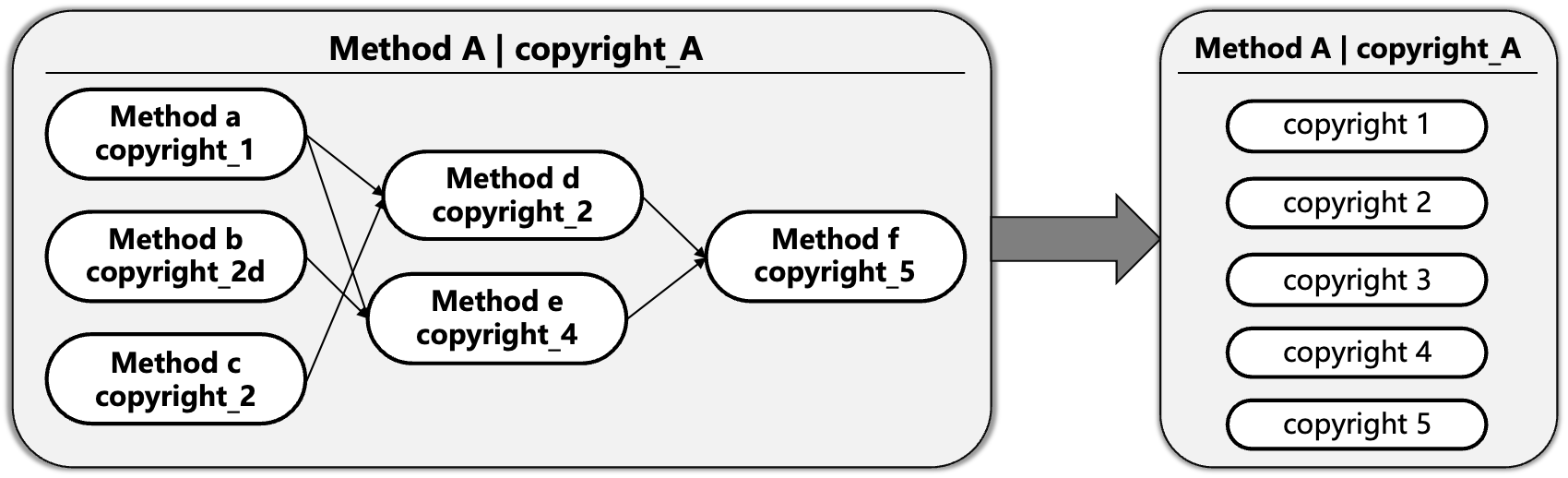
Copyright Tracking Workflow

Copyright Tracking Feature Diagram

As shown in the figure above, when Method A depends on multiple algorithms (a/b/c/d/e/f), the system automatically tracks the call chain, collects copyright information (copyright_1 to copyright_5), automatically deduplicates (e.g., copyright_2 is used by multiple algorithms but displayed only once), and presents a unified summary.

Features

Automatic Copyright Collection and Display

When the application runs, the system automatically:

  • Collects Copyright Information: Automatically records copyright information of called plugins or methods

  • Instant Display: Displays copyright declarations when methods are first used

  • Dependency Tracking: Automatically identifies and records call relationships between methods

  • Deduplication: Copyright information for the same method is displayed only once

  • Summary Report: Generates complete copyright list and dependency graph at the end of execution

Copyright Information Display Examples

Instant Display When Method is First Loaded

============= Plugin Copyright Information =============
Method Type: SIFT_FeatureExtractor
Plugin Version: 1.2.3
Build Time: 2025-01-15 10:30:45
Copyright Identifier: OpenCV
Copyright (c) 2000-2025, Intel Corporation, all rights reserved.
Copyright (c) 2009-2011, Willow Garage Inc., all rights reserved.
Third-party copyrights are property of their respective owners.
License: Apache License 2.0
=====================================

Copyright Summary at End of Process

============= Copyright Information List =============
[ Copyright.1 ]
Copyright Identifier: PoSDK
Copyright (c) 2025 PoSDK/PoCore author: Qi Cai.
Based on Pose-only Imaging Geometry Theory.
License: Proprietary
------------------------------

[ Copyright.2 ]
Copyright Identifier: OpenCV
Copyright (c) 2000-2025, Intel Corporation, all rights reserved.
Copyright (c) 2009-2011, Willow Garage Inc., all rights reserved.
License: Apache License 2.0
------------------------------

[ Copyright.3 ]
Copyright Identifier: Eigen
Copyright (c) Eigen Authors
License: MPL2 (Mozilla Public License 2.0)
------------------------------
==========================================

============= Dependency Graph =============
[Method: FeatureMatchingPipeline | Copyright Identifier: PoSDK]
     << OpenCV | Eigen

[Method: SIFT_Detector | Copyright Identifier: OpenCV]
     << (No dependencies)

[Method: BundleAdjustment | Copyright Identifier: PoSDK]
     << Ceres | Eigen
==========================================

How to Enable Copyright Tracking

PoSDK provides two ways to enable copyright tracking for plugins, depending on which base class your Method derives from.

Method 1: Derive from MethodPreset (Recommended)

This is the simplest way. If your Method inherits from MethodPreset or its derived classes (such as MethodPresetProfiler), copyright tracking is automatically enabled.

You only need to:

  1. Override the Copyright() function to return your copyright information

  2. Nothing else needs to be done!

class MyMethod : public Interface::MethodPreset {
public:
    // Just override the Copyright() function
    Interface::CopyrightData Copyright() const override {
        return {
            "MyOrganization",
            "Copyright (c) 2025 MyOrganization\n"
            "License: MIT"
        };
    }
    
    // Other method implementations...
};

MethodPreset::Build() automatically handles starting and stopping copyright tracking.

Method 2: Derive Directly from Method

If your Method directly inherits from the Method base class, you need to manually manage copyright tracking:

  1. Override the Copyright() function

  2. Call StartCopyrightTracking() and StopCopyrightTracking() in the Build() method

class MyMethod : public Interface::Method {
public:
    // 1. Override the Copyright() function
    Interface::CopyrightData Copyright() const override {
        return {
            "MyOrganization",
            "Copyright (c) 2025 MyOrganization\n"
            "License: MIT"
        };
    }
    
    // 2. Manually manage copyright tracking in Build()
    Interface::DataPtr Build() override {
        // Important: Start copyright tracking before processing
        StartCopyrightTracking();
        
        try {
            // Your algorithm implementation...
            Interface::DataPtr result = ProcessData();
            
            // Important: Stop copyright tracking before returning
            StopCopyrightTracking();
            return result;
        }
        catch (const std::exception& e) {
            // Also stop tracking in exception handling
            StopCopyrightTracking();
            throw;
        }
    }
    
    // Other method implementations...
};

Important Warning

If you derive directly from Method but do not call StartCopyrightTracking() and StopCopyrightTracking():

  • ✗ Your plugin will not be tracked by the copyright manager

  • ✗ Copyright information will be lost

  • ✗ Your plugin will not appear in the dependency graph

  • ✗ At your own risk: This may lead to copyright compliance issues

Copyright Tracking Function Documentation

// Functions provided in the Method base class
protected:
    /**
     * @brief Start copyright tracking
     * @details Adds the current method to the copyright manager's tracking stack
     *          Called at the beginning of Build()
     */
    void StartCopyrightTracking();
    
    /**
     * @brief Stop copyright tracking
     * @details Removes the current method from the copyright manager's tracking stack
     *          Called at the end of Build() (including exception cases)
     */
    void StopCopyrightTracking();

Selection Recommendations

Derivation Method

Copyright Tracking

Recommended Scenarios

MethodPreset or derived classes

Automatically enabled

✅ Recommended: Most plugin development

Direct derivation from Method

Manual management required

Use only when special requirements exist

Summary: Unless there are special reasons, you should derive from MethodPreset, so copyright tracking is handled automatically.

Reference Implementation

You can refer to the following files for implementation details:

  • /po_core/src/internal/interfaces.hpp - Method base class definition

  • /po_core/src/internal/interfaces.cpp - Copyright tracking function implementation

  • /po_core/src/internal/interfaces_preset.hpp - MethodPreset automatic copyright tracking implementation


How to Define Copyright Information in Plugins

Plugin developers need to override the Copyright() function in their method class:

Basic Usage

// In your Method-derived class
class MyFeatureExtractor : public Interface::Method {
public:
    // Override Copyright() function to return copyright info
    Interface::CopyrightData Copyright() const override {
        return {
            "YourOrganization",  // Copyright identifier

            // Detailed copyright information
            "Copyright (c) 2025 YourOrganization, All rights reserved.\n"
            "License: MIT License\n"
            "Author: Your Name\n"
            "Email: your.email@example.com"
        };
    }

    // Other method implementations...
};

Default Behavior

If this function is not overridden, the default implementation returns:

return std::make_pair("Unknown", "");

This means the plugin will be classified as no copyright identifier type.

Copyright Information Writing Guidelines

It is recommended to include the following content in copyright information:

  1. Copyright Statement - Copyright owner and year

  2. License Type - Open source license used (such as MIT, Apache 2.0, GPL, etc.)

  3. Author Information - Author name and contact information

  4. Citation Information - If the plugin is based on academic papers, include citation format (optional)

  5. Patent Statement - Algorithms involving patent protection (optional)

Complete Example

Interface::CopyrightData Copyright() const override {
    return {
        "MyResearchLab",  // Concise identifier for dependency graph display

        // Multi-line detailed information
        "Copyright (c) 2025 MyResearchLab, University of Example\n"
        "License: BSD 3-Clause License\n"
        "\n"
        "Author: Dr. Example Researcher\n"
        "Email: researcher@example.edu\n"
        "\n"
        "Citation:\n"
        "  E. Researcher et al., \"Novel Algorithm for Feature Extraction,\"\n"
        "  IEEE Conference on Computer Vision, 2025.\n"
        "\n"
        "Patent: US 10,123,456 (Method and System for...)"
    };
}

Copyright Declaration When Using Third-Party Libraries Important

Current Version Limitation: The system currently only supports each Method returning one copyright information pair (one identifier + one information string).

If a plugin uses multiple third-party libraries, you need to list all dependency library copyright information in the same copyright information string:

Recommended Format (Multi-Dependency Library Copyright Template)

Interface::CopyrightData Copyright() const override {
    return {
        "YourOrganization",  // Main copyright identifier (use your organization name)

        // ===== Main Copyright Information =====
        "Copyright (c) 2025 YourOrganization Ltd.\n"
        "License: MIT License\n"
        "Author: Your Name\n"
        "\n"
        // ===== Third-Party Library Copyright Declarations =====
        "This plugin uses the following third-party libraries:\n"
        "\n"
        "[1] OpenCV 4.x\n"
        "    Copyright (c) 2000-2025, Intel Corporation\n"
        "    Copyright (c) 2009-2011, Willow Garage Inc.\n"
        "    License: Apache License 2.0\n"
        "    URL: https://opencv.org\n"
        "\n"
        "[2] Eigen 3.x\n"
        "    Copyright (c) Eigen Authors\n"
        "    License: MPL2 (Mozilla Public License 2.0)\n"
        "    URL: https://eigen.tuxfamily.org\n"
        "\n"
        "[3] FLANN 1.9.x\n"
        "    Copyright (c) 2008-2011, Marius Muja and David G. Lowe\n"
        "    License: BSD License\n"
        "    URL: https://github.com/mariusmuja/flann"
    };
}

Simplified Format (For Fewer Dependency Libraries)

Interface::CopyrightData Copyright() const override {
    return {
        "MyCompany",

        "Copyright (c) 2025 MyCompany Ltd. | License: Commercial\n"
        "\n"
        "Third-party dependencies:\n"
        "- OpenCV (Apache 2.0): Copyright (c) OpenCV contributors\n"
        "- Eigen (MPL2): Copyright (c) Eigen Authors\n"
        "- Ceres (BSD): Copyright (c) Ceres Solver Team"
    };
}

Important Notes

  1. Copyright Identifier Selection:

    • Use your organization name as the main copyright identifier (first parameter)

    • Do not use third-party library names (e.g., “OpenCV”), as this will mislead the dependency graph

  2. Completeness Requirements:

    • Must list all directly used third-party libraries

    • Include library copyright statements and license types

    • Recommended to include official library URLs

  3. Clear Format:

    • Use separators or numbering to distinguish different libraries

    • Keep format clean and readable

  4. License Compatibility:

    • Ensure licenses used are compatible with dependency library licenses

    • For example: GPL libraries cannot be used in MIT or commercially licensed plugins

Application Scenarios

Academic Research

  • Automatically generate citation lists for paper writing

  • Track algorithm sources and versions used

  • Ensure compliant academic citations

Commercial Applications

  • Copyright compliance auditing to meet legal requirements

  • Open source license management and compatibility checking

  • Third-party library usage tracking

Open Source Projects

  • Contributor attribution and credit display

  • Automatic license compatibility checking

  • Community transparency and trust building

Best Practices

Recommended Practices

  1. Concise Identifiers: Use organization or project names as copyright identifiers (e.g., “OpenCV”, “PoSDK”)

  2. Complete Information: Include copyright statements, license types, author information

  3. Third-Party Declarations: Clearly list third-party libraries used and their licenses

  4. Academic Citations: If based on papers, provide standard citation format

Practices to Avoid

  1. Overly Long Text: Avoid including large code blocks or documentation in copyright information

  2. Hiding Copyright: Do not return empty strings or “Unknown”

  3. Incorrect Information: Ensure copyright information is accurate and truthful

  4. Missing License: Must clearly specify the license type used

Frequently Asked Questions

Q: What if I don’t want to display copyright information?

A: All plugins must provide copyright information. This is PoSDK’s design principle to protect all developers’ intellectual property. If the plugin is open source, you can choose permissive licenses such as MIT or Apache.

Q: Will copyright information affect performance?

A: No. Copyright information is displayed only once when the method is first created, and subsequent calls will not repeat the display or affect performance.

Q: Can I modify other people’s copyright information?

A: No. Each plugin’s copyright information is defined by the Copyright() function in its source code, and only the plugin author can modify it. Copyright information in compiled plugins cannot be changed externally.

Q: My plugin uses multiple third-party libraries. Do I need to list them all?

A: Yes, you must list all directly used third-party libraries and their licenses. This is best practice for open source compliance and is required by laws and regulations.

Note: The current system only supports returning one copyright information pair, so you need to list all dependency libraries in the same string. Please refer to the template in the “Copyright Declaration When Using Third-Party Libraries” section above.

Q: Why can’t I return independent copyright information for each third-party library?

A: This is a technical limitation of the current version. The Copyright() function can only return one std::pair<std::string, std::string> (copyright identifier + copyright information).

Future Improvement Plan: We are considering supporting multiple copyright information pairs in future versions, where each dependency library can have independent copyright identifiers and information.

Current Solution: Use clear formatting (such as numbering, separators) in the copyright information string to distinguish different libraries, ensuring information is complete and readable.

Q: What happens if I forget to list a third-party library’s copyright information?

A: This may lead to:

  • Legal Risks: Violating open source license requirements (e.g., Apache 2.0, GPL all require retaining copyright statements)

  • Compliance Issues: Commercial applications may fail copyright audits

  • Community Trust: Reduces the open source community’s trust in your plugin

Recommendation: Maintain a dependency library list during development and verify each one when writing copyright information.


Copyright tracking ensures that every contribution in the PoSDK ecosystem is recorded and respected, protecting developers’ intellectual property while ensuring users understand the sources and licensing requirements of the algorithms used.

Previous Next

© Copyright 2025, VINF-SJTU Group and VINF Ltd..

Built with Sphinx using a theme provided by Read the Docs.