PoSDK User Guide
GitHub Repository: https://github.com/pose-only-vision/PoSDK
PoSDK is a C++ software platform for Spatial Visual Computing, designed for 3D multi-view geometry processing, including camera pose estimation, feature point cloud generation, and more.
This guide introduces the PoSDK architecture, core library usage, and custom plugin development.
Core Features
Pose-only Geometry Theory: Based on innovative Pose-only Imaging Geometry theory, enabling efficient and robust pose estimation
Modular Plugin System: Flexible feature extension through DataPtr and MethodPtr
Performance Profiling Tools: Built-in profiler for real-time monitoring of memory, CPU, time, and other metrics
Automatic Evaluation: Built-in accuracy evaluator that automatically collects, statistics, and exports various accuracy metrics of algorithms
Copyright Tracking: Automatically collects and displays copyright information of algorithms to protect intellectual property
Cross-platform Support: Supports macOS (arm64), Linux (x86_64/aarch64)
Bilingual Logging: Chinese-English bilingual log output
Platform Integration and Comparison: Supports integration and comparison with mainstream 3D reconstruction platforms (OpenMVG, COLMAP, GLOMAP, etc.) → View Comparison Results
System Architecture
PoSDK adopts a layered architecture design, isolating the core computing engine from upper-layer applications and providing flexible secondary development interfaces through the SDK.
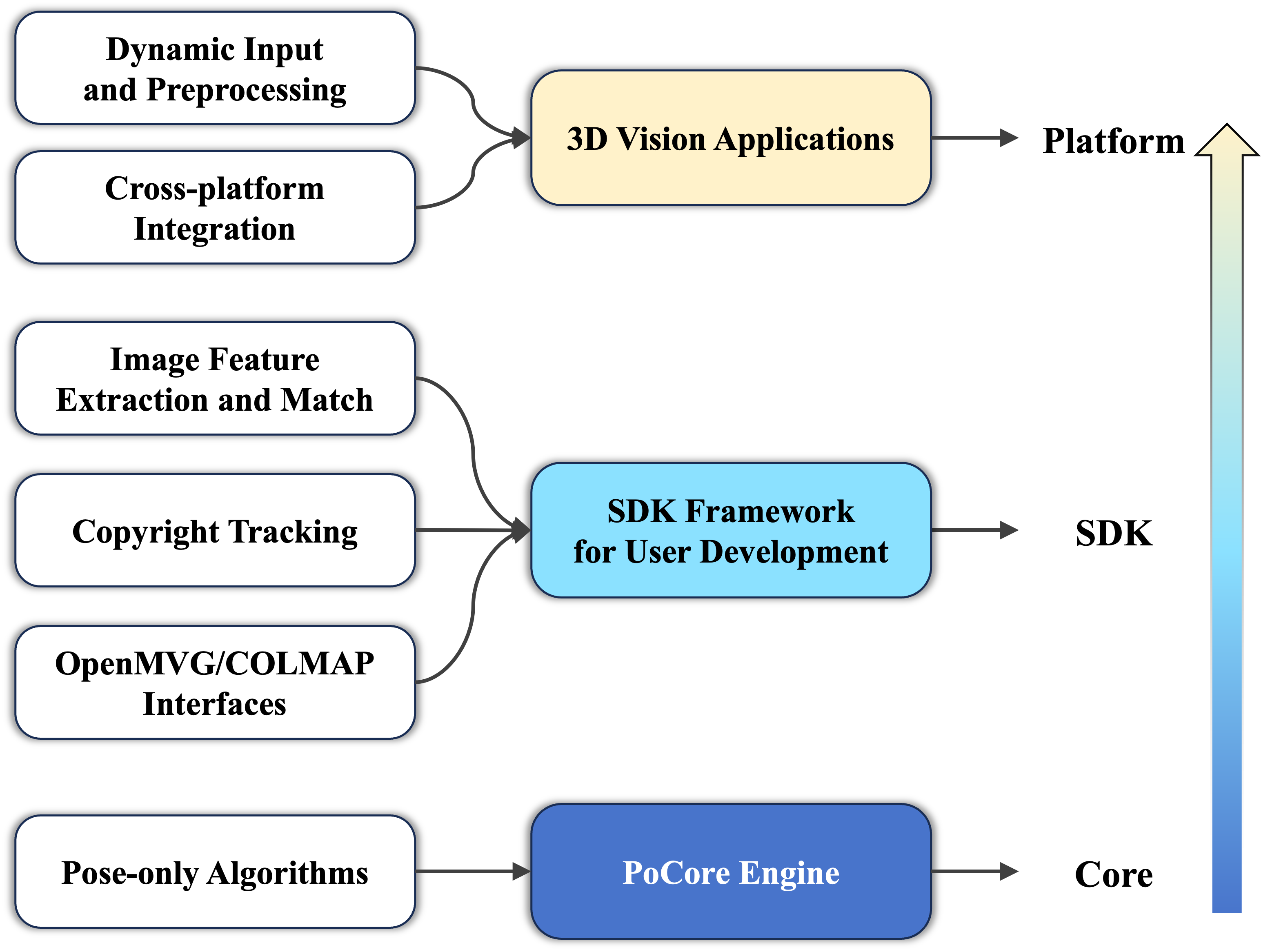
PoSDK Architecture Layers Diagram
The main components include:
Core Layer:
Contains the core computing engine based on Pose-only Visual Geometry Theory (internally developed and maintained).
Responsible for handling low-level geometric computations, optimization problems, etc.
Interface Layer (SDK):
Provides SDK development plugin modules, encapsulating core algorithm interfaces to support user secondary development.
Includes modular functions such as data processing, feature extraction and matching, outlier handling, dense reconstruction, and cross-platform support.
Plugin System: One of PoSDK’s core features, allowing users to dynamically load and extend algorithm functionality by developing custom plugins (DataPtr, MethodPtr, BehaviorPtr) without modifying core library code.
DataPtr: Used to encapsulate various data types.MethodPtr: Used to implement specific algorithm logic.BehaviorPtr(Reserved): Used to organize and call a series of methods to form workflows.
Application Layer:
Builds specific business applications based on the SDK and plugin system, such as 3D reconstruction software, SLAM systems, AR applications, etc.
Copyright Tracking and Intellectual Property Protection
PoSDK has built-in automatic copyright tracking functionality.
Why Copyright Tracking?
3D visual computing applications often use multiple algorithm libraries and tools, for example:
Feature extraction may use OpenCV’s SIFT/SURF
Pose estimation may use OpenGV’s solvers
Optimization solving may use Ceres Solver
Matrix operations may use Eigen
Problem: Third-party libraries typically have different licenses and copyright requirements, making manual tracking and management tedious.
PoSDK’s Solution
PoSDK’s copyright tracking provides the following features:
Automatic Collection: Automatically collects copyright information of algorithms and libraries used at runtime
Instant Display: Shows copyright declarations when methods are first loaded
Dependency Tracking: Automatically builds complete algorithm call dependency graphs
Transparent Compliance: Ensures proper display of third-party library copyright information
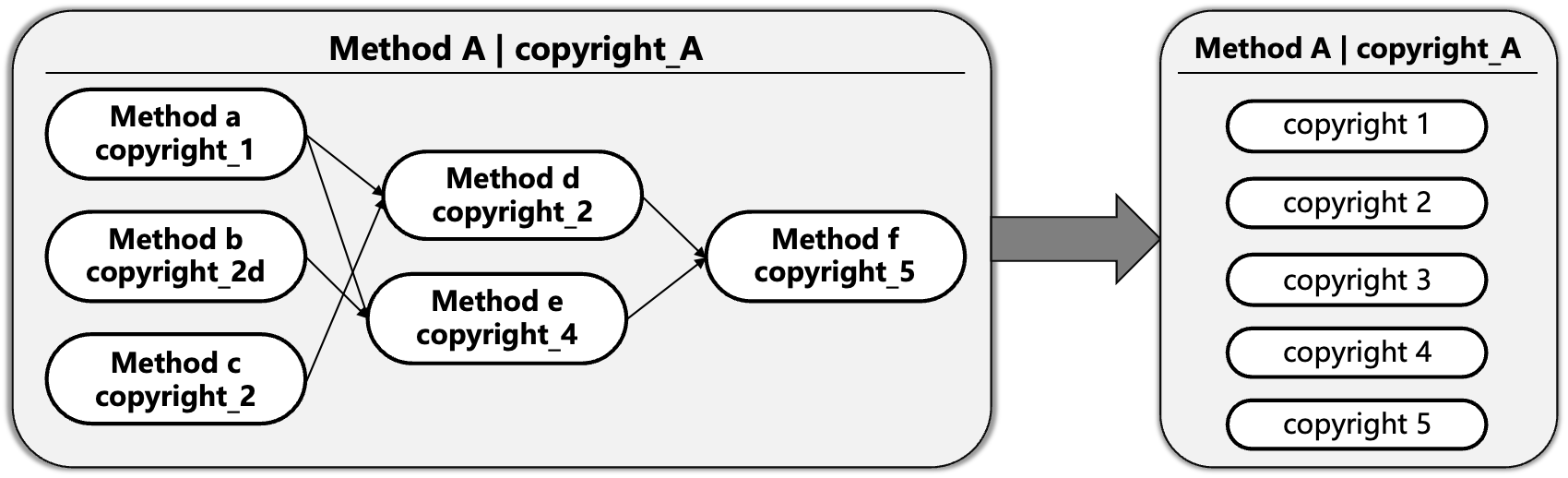
Copyright Tracking Working Principle: The left side shows that Method A depends on multiple algorithms (algorithms a/b/c/d/e/f), each with its own copyright information (copyright_1 to copyright_5). The system automatically tracks these dependencies and displays a unified summary of Method A and all its dependent algorithms’ copyright information (see right side), ensuring copyright transparency and compliance.
How It Works
As shown in the figure above, the copyright tracking workflow is as follows:
Dependency Relationship Identification: When Method A calls other algorithms (such as algorithms a, b, c, etc.), the system automatically identifies various dependency relationships
Copyright Information Collection: Each algorithm declares copyright information by overloading the
Copyright()functionAutomatic Deduplication and Merging: The system automatically collects and deduplicates copyright information from all dependent algorithms (e.g., copyright_2 is used by multiple algorithms but displayed only once)
Unified Display: When Method A is first loaded, the system automatically displays a complete list of copyright information for itself and all dependent algorithms
For detailed usage, please refer to: Copyright Tracking Feature Documentation
Automatic Evaluation
PoSDK has built-in Global Evaluator (EvaluatorManager), providing performance evaluation and data analysis functionality.
Why Automatic Evaluation?
In research and application development, it is often necessary to:
Compare performance of different algorithms on the same dataset
Evaluate the same algorithm’s performance under different parameter configurations
Statistically analyze evaluation results (mean, median, standard deviation, etc.)
Generate visualization charts for papers and reports
Problem: Manual data collection, statistical calculation, and chart generation require significant effort.
PoSDK’s Solution
PoSDK’s accuracy evaluation system provides the following features:
Automatic Collection: Automatically collects algorithm evaluation results (rotation error, translation error, reprojection error, etc.)
Intelligent Classification: Automatically categorizes and manages by evaluation type, algorithm name, and metric name
Statistical Analysis: Automatically calculates statistics such as mean, median, max/min values, standard deviation, etc.
CSV Export: Supports multiple CSV data export formats for subsequent analysis
Visualization Generation: Automatically generates high-quality comparison charts (supports Python/matplotlib)
Multiple Annotation Types: Supports adding various types of annotation information to each evaluation result (such as core runtime, view pair identifiers, etc.)
For detailed usage, please refer to: Evaluation System Documentation
Platform Integration and Comparison
PoSDK supports integration and comparison testing with multiple mainstream 3D reconstruction platforms, including OpenMVG, COLMAP, GLOMAP, etc.
Why Platform Comparison?
Current mainstream 3D reconstruction platforms each have their own characteristics:
OpenMVG: Classic open-source multi-view geometry library providing complete SfM workflow
COLMAP: Industry-leading 3D reconstruction system supporting SfM and dense reconstruction
GLOMAP: New-generation global optimization platform focusing on rapid reconstruction of large-scale scenes
Problem: How to objectively evaluate the performance and accuracy of different platforms on the same dataset?
PoSDK’s Solution
PoSDK provides a unified comparison testing framework:
Unified Data Format: Supports converting outputs from different platforms into a unified data format for comparison
Automated Testing: Implements automated batch testing through configuration files and scripts
Multi-dimensional Evaluation:
Performance Comparison: Performance metrics such as runtime and memory consumption
Accuracy Comparison: Accuracy metrics such as global pose errors (rotation/translation) and relative pose errors
Statistical Analysis: Statistics such as mean, median, max/min values, standard deviation, etc.
How to Use the Comparison Feature
Prepare Data: Ensure the dataset contains ground truth information
Configure Testing: Specify platforms and parameters to compare in configuration files
Run Tests: Execute automated tests using provided scripts
View Results: System automatically generates comparison reports and visualization charts
For detailed comparison test results and analysis, please refer to: Benchmark Comparison Results
Next Steps: Continue reading the Installation Guide to get started with PoSDK.